> ## Documentation Index
> Fetch the complete documentation index at: https://docs.sciforium.com/llms.txt
> Use this file to discover all available pages before exploring further.
# Using the Playground
# Overview
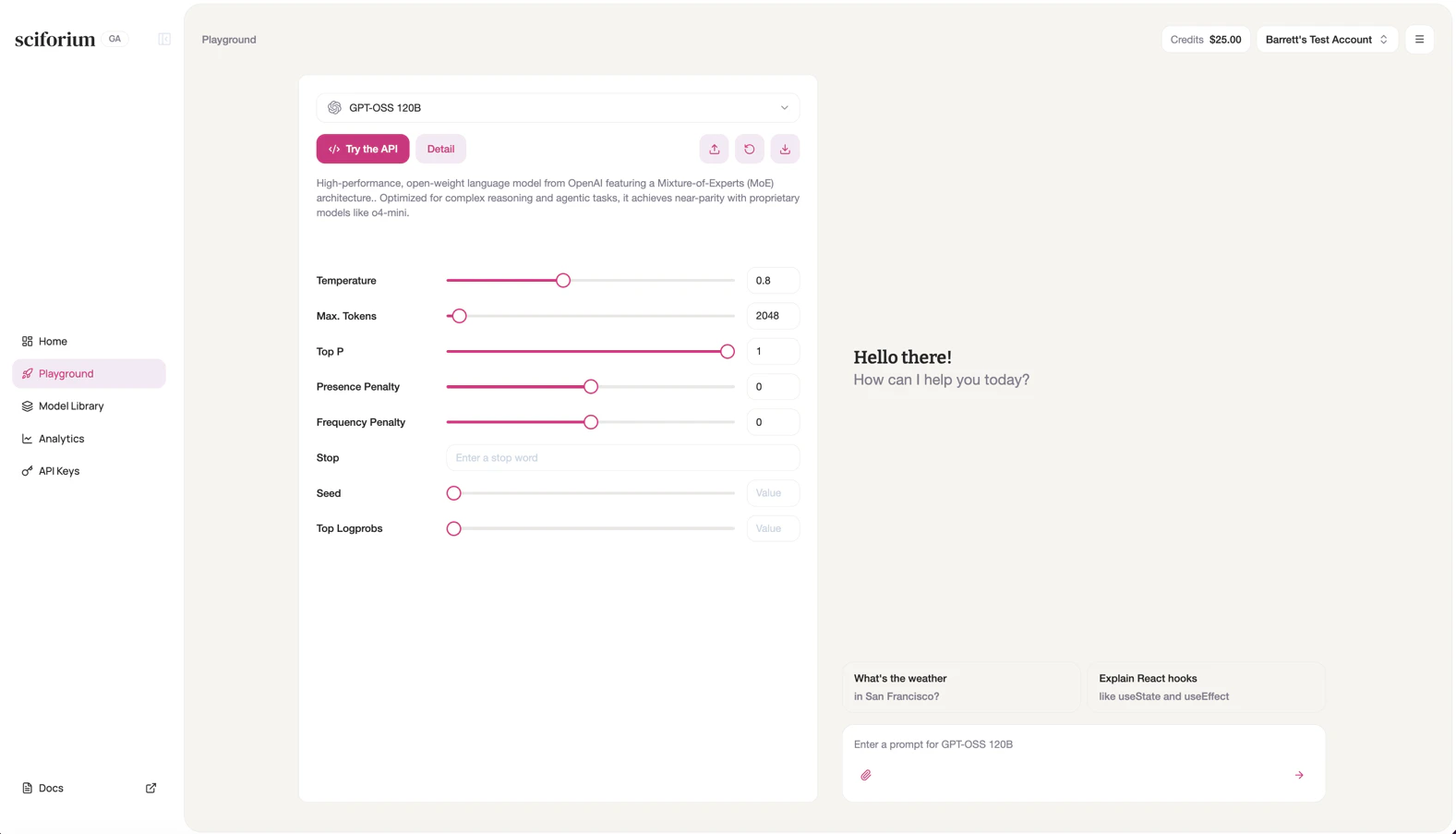
The Playground lets you interact with any model directly in the browser — no code required. It's the fastest way to evaluate a model, test a prompt, or explore parameters before integrating via API.
**To use the Playground:**
1. Click **Playground** in the left sidebar, or select a model from the Home screen.
2. The active model appears in the dropdown at the top of the left panel. Click it to switch models.
3. Adjust parameters in the left panel as needed.
4. Type your prompt in the input box on the right and press Enter or the arrow button.
5. Responses stream in real time. Click **New Chat** in the top right to start a fresh session.
Additional toolbar options let you share, reset, or download the current session.
 # Configurations
## LLM
| Configuration | Description |
| :-------------------- | :------------------------------------------------------------------------------------------------------------------------------------------------- |
| **Temperature** | Controls randomness. Lower values (e.g. 0.2) produce focused, deterministic responses. Higher values (e.g. 1.0) increase creativity. Default: 0.7. |
| **Max. Tokens** | Maximum tokens the model generates in a single response. Default: 2048. |
| **Top P** | Nucleus sampling threshold. 1.0 disables nucleus sampling. Default: 1. |
| **Presence Penalty** | Penalizes tokens already in the output, encouraging new topics. Range: -2.0 to 2.0. |
| **Frequency Penalty** | Penalizes repeated tokens proportionally, reducing word-level repetition. Range: -2.0 to 2.0. |
| **Stop** | One or more strings that cause the model to stop generating. |
| **Seed** | Fixed seed for reproducible outputs across identical requests. |
| **Top Logprobs** | Returns log probabilities for the top N tokens at each position. Useful for debugging. |
| **N (Choices)** | Number of independent completion responses generated per request. |
## Image
| Configuration | Description |
| :-------------- | :----------------------------------------------------------------------------------------------------------------------------------- |
| Size | Dimensions of the generated image (e.g. 512×512, 1024×1024). Larger sizes produce more detail but increase generation time and cost. |
| Image (n) | Number of independent images generated per request. |
| Inference Steps | Number of denoising steps during generation. More steps generally improve quality and detail but increase latency. |
| Seed | Fixed seed for reproducible image outputs across identical requests. |
## Video
| Configuration | Description |
| :------------ | :----------------------------------------------------------------------------- |
| Duration | Length of the generated video in seconds. |
| Size | Resolution and aspect ratio of the generated video (e.g. 1280×720, 1920×1080). |
## Audio
| Configuration | Description |
| :------------ | :---------------------------------------------------------------------------------------------------------------------------------------------- |
| Voice | Selects the speaker voice used for audio synthesis (e.g. alloy, echo, nova). Each voice has a distinct tone and style. |
| Format | Output audio file format (e.g. mp3, wav, opus). Affects file size, compatibility, and audio fidelity. |
| Language | Language of the synthesized speech output. Determines pronunciation, accent, and linguistic rendering. |
| Speed | Playback speed of the generated audio. Values above 1.0 increase speed; below 1.0 slow it down. Default: 1.0. |
| Max Tokens | Maximum number of tokens from the input text processed per request. Limits the length of text that can be converted to speech in a single call. |
# Configurations
## LLM
| Configuration | Description |
| :-------------------- | :------------------------------------------------------------------------------------------------------------------------------------------------- |
| **Temperature** | Controls randomness. Lower values (e.g. 0.2) produce focused, deterministic responses. Higher values (e.g. 1.0) increase creativity. Default: 0.7. |
| **Max. Tokens** | Maximum tokens the model generates in a single response. Default: 2048. |
| **Top P** | Nucleus sampling threshold. 1.0 disables nucleus sampling. Default: 1. |
| **Presence Penalty** | Penalizes tokens already in the output, encouraging new topics. Range: -2.0 to 2.0. |
| **Frequency Penalty** | Penalizes repeated tokens proportionally, reducing word-level repetition. Range: -2.0 to 2.0. |
| **Stop** | One or more strings that cause the model to stop generating. |
| **Seed** | Fixed seed for reproducible outputs across identical requests. |
| **Top Logprobs** | Returns log probabilities for the top N tokens at each position. Useful for debugging. |
| **N (Choices)** | Number of independent completion responses generated per request. |
## Image
| Configuration | Description |
| :-------------- | :----------------------------------------------------------------------------------------------------------------------------------- |
| Size | Dimensions of the generated image (e.g. 512×512, 1024×1024). Larger sizes produce more detail but increase generation time and cost. |
| Image (n) | Number of independent images generated per request. |
| Inference Steps | Number of denoising steps during generation. More steps generally improve quality and detail but increase latency. |
| Seed | Fixed seed for reproducible image outputs across identical requests. |
## Video
| Configuration | Description |
| :------------ | :----------------------------------------------------------------------------- |
| Duration | Length of the generated video in seconds. |
| Size | Resolution and aspect ratio of the generated video (e.g. 1280×720, 1920×1080). |
## Audio
| Configuration | Description |
| :------------ | :---------------------------------------------------------------------------------------------------------------------------------------------- |
| Voice | Selects the speaker voice used for audio synthesis (e.g. alloy, echo, nova). Each voice has a distinct tone and style. |
| Format | Output audio file format (e.g. mp3, wav, opus). Affects file size, compatibility, and audio fidelity. |
| Language | Language of the synthesized speech output. Determines pronunciation, accent, and linguistic rendering. |
| Speed | Playback speed of the generated audio. Values above 1.0 increase speed; below 1.0 slow it down. Default: 1.0. |
| Max Tokens | Maximum number of tokens from the input text processed per request. Limits the length of text that can be converted to speech in a single call. |