Overview
The Playground lets you interact with any model directly in the browser — no code required. It’s the fastest way to evaluate a model, test a prompt, or explore parameters before integrating via API. To use the Playground:- Click Playground in the left sidebar, or select a model from the Home screen.
- The active model appears in the dropdown at the top of the left panel. Click it to switch models.
- Adjust parameters in the left panel as needed.
- Type your prompt in the input box on the right and press Enter or the arrow button.
- Responses stream in real time. Click New Chat in the top right to start a fresh session.
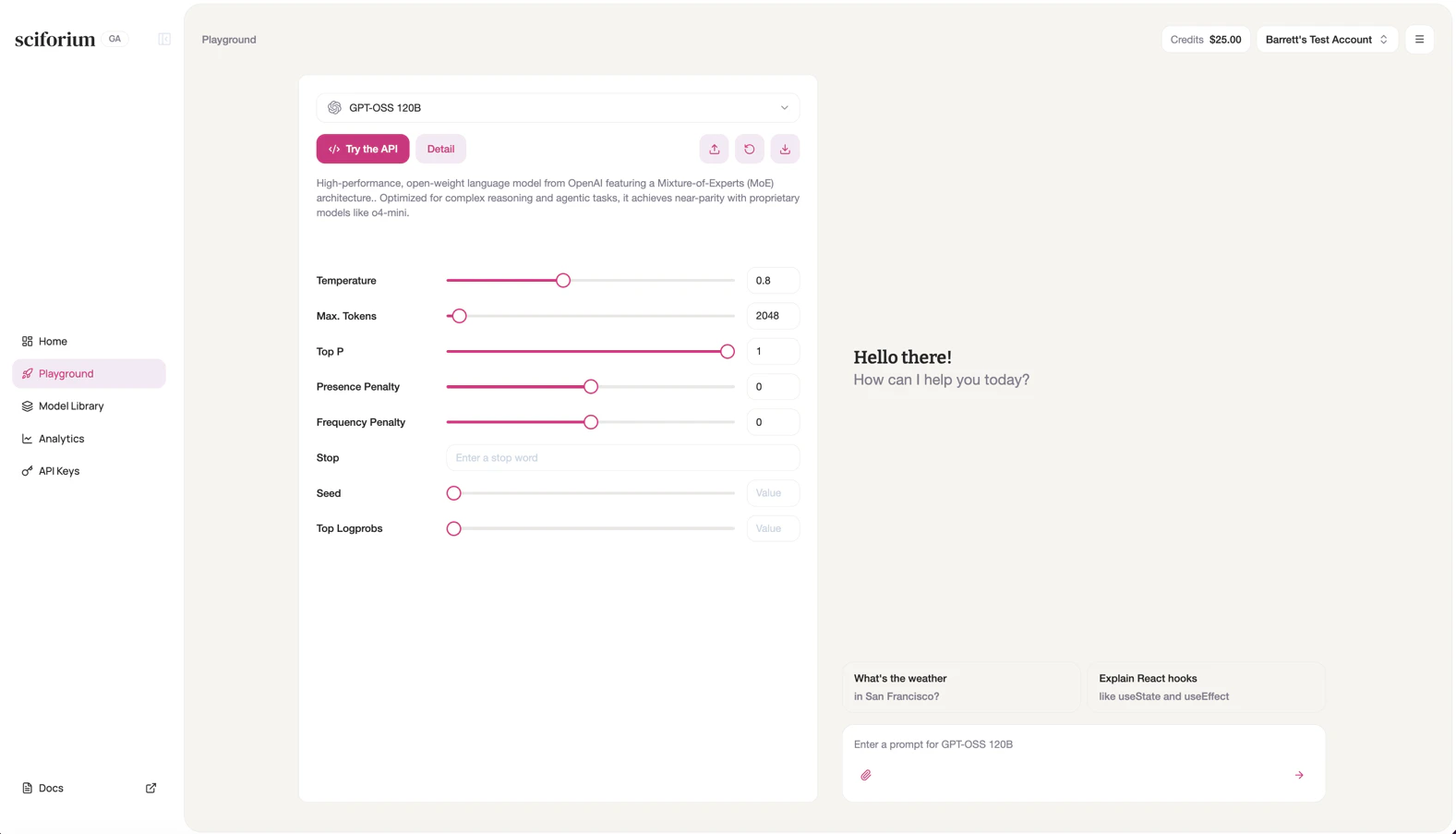
Configurations
LLM
| Configuration | Description |
|---|---|
| Temperature | Controls randomness. Lower values (e.g. 0.2) produce focused, deterministic responses. Higher values (e.g. 1.0) increase creativity. Default: 0.7. |
| Max. Tokens | Maximum tokens the model generates in a single response. Default: 2048. |
| Top P | Nucleus sampling threshold. 1.0 disables nucleus sampling. Default: 1. |
| Presence Penalty | Penalizes tokens already in the output, encouraging new topics. Range: -2.0 to 2.0. |
| Frequency Penalty | Penalizes repeated tokens proportionally, reducing word-level repetition. Range: -2.0 to 2.0. |
| Stop | One or more strings that cause the model to stop generating. |
| Seed | Fixed seed for reproducible outputs across identical requests. |
| Top Logprobs | Returns log probabilities for the top N tokens at each position. Useful for debugging. |
| N (Choices) | Number of independent completion responses generated per request. |
Image
| Configuration | Description |
|---|---|
| Size | Dimensions of the generated image (e.g. 512×512, 1024×1024). Larger sizes produce more detail but increase generation time and cost. |
| Image (n) | Number of independent images generated per request. |
| Inference Steps | Number of denoising steps during generation. More steps generally improve quality and detail but increase latency. |
| Seed | Fixed seed for reproducible image outputs across identical requests. |
Video
| Configuration | Description |
|---|---|
| Duration | Length of the generated video in seconds. |
| Size | Resolution and aspect ratio of the generated video (e.g. 1280×720, 1920×1080). |
Audio
| Configuration | Description |
|---|---|
| Voice | Selects the speaker voice used for audio synthesis (e.g. alloy, echo, nova). Each voice has a distinct tone and style. |
| Format | Output audio file format (e.g. mp3, wav, opus). Affects file size, compatibility, and audio fidelity. |
| Language | Language of the synthesized speech output. Determines pronunciation, accent, and linguistic rendering. |
| Speed | Playback speed of the generated audio. Values above 1.0 increase speed; below 1.0 slow it down. Default: 1.0. |
| Max Tokens | Maximum number of tokens from the input text processed per request. Limits the length of text that can be converted to speech in a single call. |